

How will my baby look like?
This website uses face detection technology and just requires uploading a couple of photographs to generate the picture of the predictive baby of the couple.
These online applications are really entertaining as individuals can opt for combining their photographs and some celebrities to view result which generates what the possible baby would look like. The generators work on the basis of facial expressions and tone in the respective photographs uploaded and are not on the basis of genetics. Genetically it is quite complicated to presume the picture of a baby beforehand.
The process of generating the picture of a baby is quite simple. An individual just requires uploading the photograph of one’s own along with the respective partner to view what the generator would generate on the basis of the provided photograph. As per the generators the process of the baby picture generation involves the analyzing followed by retouching of the respective uploaded images which ultimately fetches a cool picture of the baby a couple may eagerly wait to see.
It is incredibly funny to experience such baby pictures by simply logging on to the net. The increasing popularity of these websites reveals that entertaining the baby picture generation is among the crowd globally. It is amazing to witness unique photographs each time as the website generates each time.

Which Browser to choose
First, there was only Internet Explorer. Everyone was using it, but honestly, it always sucked. Then, Firefox came out. It was a revolution. It took a piece of the puzzle from IE, as more and more users began to transition to FF. After that, Google Chrome came out. Of course, by just having "Google" in front of the name, that's enough guarantee for its quality. Each side is claiming that their browser is the best, the fastest, the prettiest and much more. But which one is for you?
If you're one of those people who don't like to install new things, you're probably going to be fine with Internet Explorer. It comes preinstalled with Windows, and it will suit most of your needs. However, if you'd like to see web pages open faster, you might want to try Firefox. Firefox (and Chrome) are open source programs, so that is an advantage for them. However, the main disadvantage of Firefox is that it takes up too much memory. If your computer doesn't have enough RAM, it might freeze. Finally, there is Chrome.
Chrome is the newest browser of these three, and Google made it. It's fast, and it doesn't take a lot of memory. It's very simple and easy to use.
So, make your choice and choose the right browser for you.
 You have probably been a witness to the browser war that's being more and more intense. Companies who make this software (at least most of them) are trying to earn money, so they are trying to have their product to be the number one, naturally. But is is the right thing to do? How do you, as an ordinary user, decide which browser to use?

An easy way to convert SWF to SCR (ScreenSaver)
Getting your swf to exe and swf to scr file conversion is pretty simple, you just need to compile your scr and exe file with swf maestro. it can convert your swf file to an executable application of .exe extension similarly you can also convert your swf file into a screensaver (.swf extension). The benefit with this software is that you can generate the exe's from your swf which also include blank or transparent backgrounds.
This software can also be used to generate "try before you buy" application program of your swf projects if you need to offer your flash projects for review. Swfmaestro can help you save your product it provide a clear judgment of your product and project to your clients. It supports various swf files and also allow files like video, audio, images, xml and many other file types. The result window is draggable and can be resize with ease and comfort of the user. you can download the trial versions on the homepage of Swfmaestro
 Converting your file format is the most common thing the users try to do when they acquire some sort of experience. The file conversion can be done for different conversion like securing personal data, to bring down the disk space involved, cover the things which others can not identify [open] and many more. Today we will discuss how to Convert your flash files into exe and scr.

Snagit 9~ An effective Image capturing Software | snagit 9 + crack | snagit 9 keygen
2007-esque interface. The other nice feature is the seamless intergration with your email client and desktop application
Features:
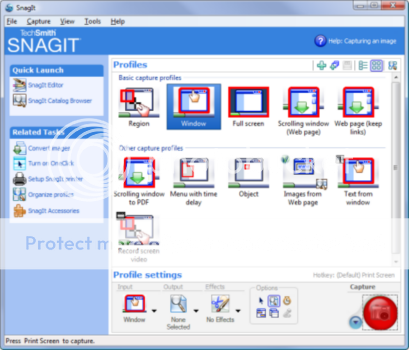
The home screen shows all the capture profiles. These let you capture the full screen, the active window, a section of the screen or a scrolling window. There are other useful profiles such as a capturing a web page with active links, capturing only text, capturing menus or an object on screen.
Once a screen i captured, The snagit editor pops up and offer option to annotate the image in various ways, and we discuss these later in this review.
Snagit intergrates seamlessly with your default email client, Microsoft office applications , FTP. clipboard, web browser and any other program that you predefine, After capturing an image click the 'send' button and specify which program the output is to be sent to.
Captured images can be saved to a variety of image formats ( png, gif, jpeg, tif ) . we liked the inclusion of adobe PDF and Flash formats.
Then there are other features like image tagging and the visual search pane, which we will soon discuss
Performance:
We found that snagit keeps a record of all capture profiles used in the past, so that one can reuse the customized profiles. This useful feature is called 'Manage profiles'. It's also possible to import and export capture profiles, In case you use snagit on multiple computers.
The scrolling window capture with its default scroll speed was a bit slow. it took us almost 45 seconds to captur a two page word document. However, capturing a cached home page was instantaneous.
We explored the snagit Editor and found that it includes advanced editing features such as color depth, color correction, and color substitution in the 'Effects' section. It might take a while for someone with no background in design to understand these advanced features. Images can be annotated with text boxes or arrow symbols to draw attention to a specific part, There are attributes and more , for the arrows and shapes that you overlay on the image, You can also add effects such as shadows, perspective and shear.
As we went about capturing images we noticed that these were automatically saved in a library, Even when we cloed the application. without saving the captured images, we were able to access these through the Visual search pane in the Snagit Editor, This is really what the Auto-store feature is all about. Use the Visual search pane within the Snagit Editor to find images, from the library or to access folders on the hard disk, Images can be organized by tags, Tags that be attached to images have names like 'Funny', ' Personal ', ' Financial ', ' Follow-up ', and so on. This enables you to organize images in groups to quickly find these Later.
 Nowadays people need to capture a lot more than just a single screen. Since people spenda lot of time surfing websites and using software. they would want to do things like capturing scrolling web pages and document windows or recording screen videos snagit makes all such tasks a breeze. Techsmith claims its tools can actually improve efficiency with its 'Fluid Workflow' design Two features stand out in snagit. For one, It's simple to use thanks to its MS office

FruitfulTime Task Manager : Software Tested
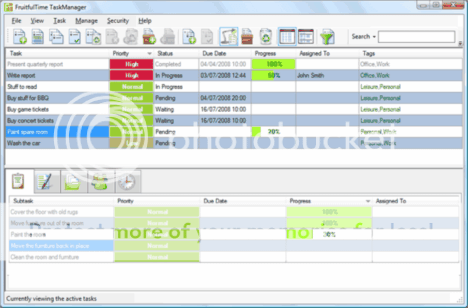
FruitfulTime Task Manager does just what it promises but it a simple task management for stress-free productivity. With the simple design and configuration, you should be understand each icon and button functionality easily.It keep all tasks in one place who easy to find, add, and update.
This to do list software is made for windows operating system and is extremely useful, with good features and above average performance, It offers built-in password protection feature, and instantly takes steps by making you to chose a password . Fruitfultime Task Manager keeps all your task secret. and the security feature allows you to make your all tasks safe .
Just set the details of the remainders for a specific date/time and then you will get a reminders which is some what similar to the alarm I personally tried using it and the results are great. You can purchase it in only $29.99 and try it for 30 Days .
 Your schedule must be hectic with work and deadlines, Meeting and dealing with clients. and you must be thinking that How to manage all of this appropriately? How to check you not miss all the important plans for entire day. Fruitfultime Task Manager is the solution, Fruitfultime Task Manager is one of important Task software tool that could be manage all your schedule daily.
Snagit 7 | Snagit download | free snagit | Snagit free download | Snagit freeware |

Our focus this month is software which is extremely useful, with good features and above average performance, No software is perfect through these get better with each new realease, and we have pointed out potential areas for improvement, Snagit has come a long way and has evolved to become much more than a screen capture utility, The 9th version has a built in image editor with a lot of musle, It also makes it a lot easier to organize and share images.
We found two other useful tools Feedreader and ConvertX to DVD , The former is a powerful RSS feed reader A must for all those who read news online everyday, If you download a lot of movies and videos from the net and want to watch these on the home theatre system then you can either buy a DVD player that supports DivX or use ConvertX to DVD, This software lets you create your own home movie DVD's, complete with menus, titles and backgrounds with great ease.
We also test two system utilities Fresh UI has hundreds of settings for configuring and optimize system and hardware settings, optimize system and hardware settings, and control the user environment with policies, TreeSize is a hard disk space manager that depicts the usage of file storage on various drives, thereby helping you recover free Spaces, Essential for those who generate a lot of content or install many applications.
Video Transcoding - ConvertX to DVD 3
Want to watch your Downloaded collection of movies on the home theatre system? To do this you will need to convert the videos into the VOB format of DVD video. This can be done using tools like Nero or Roxio, but Convertx to DVD does the job really well. With it you can also design the menus for your home DVD movie. Of course, you can just buy yourself a DVD player that plays Divx, There's support for a wide range of formats that include avi, divx, xvid, mov, mkv, flv, mpeg1, mpeg2, mpeg-, nsv, dvr-ms, tivo, ts, ifo, vob, wmv, realmedia. existing files from digital camcorders, TV/Sat, capture cards and so on.
We liked the exhaustive set of options for defining various aspects of DVD creation such as encoding quality, DVD target size, video and audio processing parameters, chapter intervals, DVD resolution and so on.
You can either define these parameters from a dialog box or through the tree view, If you opt for the latter, where options are neatly categorized, simply click on the default text and replace it with you text - as in the case of "Title text for Title Menu"
As we went about converting a video and making a DVD we noticed that previews were always shown at each step, This feedback helped us make refinments before burning the DVD using the built - in CD burning engine.
Next post will feature how to Convert your flash into exe and scr? and for more tutorials keep visiting Digital Compass.
VERDICT: This tool makes it easy to create custom DVDs for home movies
FOR: Exhaustive set of options.
AGAINST: None

Windows Optimization with Fresh UI 8
Fresh UI has hundreds of settings for configuring and optimizing windows
XP/2000/NT/98/95/Me. With it you will be able to customize the windows user interface and applications settings, and control the user environment with policies, A plus point here is the good organization of the feature set with sections such as Applications, Hardware, Windows system and so on, This makes for easy navigation and usage, With Fresh UI you are essentially tweaking the windows registry settings. But you can also use it to enforce policies such as disallowing users to change the desktop wallpaper.
The benefit here is that you get a simple interface to play around with registry settings, As a precaution, Back up these registry first, So that you can revert to its earlier version if something goes wrong.
Probing into the ' Tools ' menu we discovered ways to tweak settings for the Dr watson windows debug tool For instance, you can specify the number of errors to save and opt for visual notification, if the integrity of data is a top concern then tweak the file signature verification setting, You can ask to be notified if system files are modified. A registry cleaner and editor is included. There's also a text editor for editing system configuration Files ( INI ), config.sys and autoexec.bat VERDICT: A tool that makes Windows look and work the way you want to.
FOR: Easy navigation through features with detailed descriptions.
AGAINST: Does not work with Windows Vista.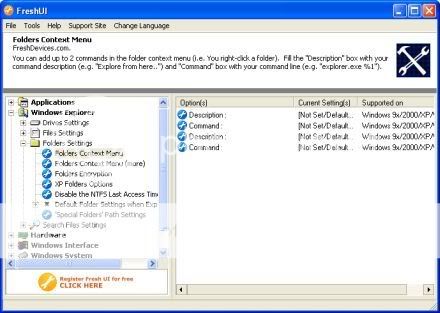
Smarter Way for making free labels and covers
I tried many freeware to create labels and covers for my mp3 and video collections (24 and Smallville infact I recently bought one paid software but result were all same, it was quite complex to use. I definitely didn't want to go to the same dead end and waste my time again. so i decided to give up ,Ronyasoft is another cd and dvd label software and Suffice to say it worked really well and I finally managed to use it with an ease though it has some limitations like you can't change the position of the image.
It is really a good software when it comes to making labels, covers for your mp3 and video collections, photo archives and backups. Not like many other paid softwares, most other media recording softwares are only associated to common file types. This software was able to do amd conversion and almost every file out there.
I am not a expert in graphics and printing business, i previously used to design labels using nero cover designer , but that whole process was quite tedious and now with this cool program you just need to printout the design on a paper then takeout the printed part and you are done ! But That’s not lazy - it’s smart..........
Looking for cd cover maker?

Tracker: Easy To Use Vehicle Tracking Device
Tracker is just one of the many GPS branded vehicle tracking systems on the market today. Tracker can be easily installed in your vehicle and it is simple to use. The units when installed will be able to tell you where the car is, where it has gone, and monitor other options. It uses a Global Position System or GPS and can work with your mobile phone. If you ever need to look at where your fleet or car is you can also use the internet.
With your regular web browser you just log in to Tracker Reporter and get all the details you need. For example if you need historical reports, information on current location, or when the vehicle may have gone off the map you can get that simply by logging on.
There are also insurance benefits to using Tracker. Tracker has a high rate of recovery. It even meets Thatcham standards, which is the official company for security protection. Insurance companies recognise Tracker and quite often give discounts to any vehicle with the device.
Avira free downloads | Trial Avira for free
Avira provides large range of products that include software solution and IT security service for network protection to various size of companies and also for individual home users. Currently, Avira is giving Ninty days of genuine license key for two of their products, Avira Antivirus Premium and Premium Security Suite.Its a great protection against malicious software arguably a security suites most important task. But it does not do much else.
Avira Premium Security Suite
Avira Premium Security Suite firewall did not completely protect our Vista test PC, for example and it lacks some essential features like Web anti phishing and parental controls.
How to get genuine license key
1. Visit the promotional page.
2. Fill the forms and click on the “Request License Now” button.
3. Look your inbox for an email from Avira. also you can simply hit "License Overview" button to get the license key and to download the software.
4. Download both license key (HBEDV.KEY) and Avira AntiVir Premiumto your computer.
5. Start the installation process. During installation, you will be prompted to import the HBEDV.KEY license key to validate your Avira Premium Security Suite.
Avira Antivir Premium
Avira AntiVirus Premium provides the comprehensive protection of the Avira AntiVirus Personal - Free Antivirus with important security and configuration features and protect you against viruses, worms, Trojans, ad/spyware, dialers, bots and dangerous ''drive-by'' downloads.
How to get genuine license key
1. Visit the promotional page.
2. Just follow procedure given for Avira Premium Security Suite and you will be able to install and validate your Avira Antivirus Premium.

Download Apple's iPhone new 2.2.1 firmware | software update
Talking about the update, it enhance the Safari's stability and fix some image issue in which photos saved from Mail don't display properly in the Camera Roll. though it has been much rumored that the addition of support for push notifications will be included, but its not the case with this update
Don't worry, it may come in the near future, probably along with Bluetooth feature, God knows :)
For those having problem to update it via iTunes (just like me), you can download directly with the following links
Above download links have resume support, so you might need any download managers to handle the download. Once the download is completed, connect your iPhone to your PC. Press and hold "shift" button while clicking on the update button (iTunes interface). That will effectively open a windows popup where you can locate the downloaded firmware. The rest is pretty simple....
 Apple has released their iPhone 2.2.1 software update last week. There's nothing special about it since this new update has no new Important features except some fixe and minor improvement. You can updgrade your iPhone with the latest firmware with the click of your computer mouse. iTunes will then take the whole download and installation process right after you confirm to upgrade your iPhone.


Gsm cell phone tracking | symbion mobile Tracking
New cell phones comes with built in GPS receiver which can be used in a similar fashion, with much more accuracy, it is usualy for GSM phones which doesn't have in built GPS.
Compatibility Supported phones
Any Series 60 smartphone
Sendo X, X2
Siemens SX-1
Lenovo P930
S60 platform 2nd Edition
Panasonic X700, X800
Samsung SGH-D720, SGH-D730
S60 platform 3rd Edition (Symbian OS v9.x) Released!
Nokia 3250, 5500, 6110 Navigator, 6290, E50, E60, E61, E62, E65, E70, E90, N71, N73, N75, N80, N91, N92, N93, N95
NB. N73, N93 owners NB. E90 7.40.1.2 and N95 20.0.015 owners
Series 80 platform 2nd Edition (Symbian OS v7.0s)
Nokia 9300, 9500
Supported GPS devices.
 This new Gsm cell phone tracker intercept the current location of any cell phone, this software actualy help the user to track thier mobile phone when stolen. The cell phone theft world over are huge.It can also be used as a personal tracker, It uses gps as a mode to recieve signals - - - - - - - - - - - -
YouTube, Yahoo, Metacafe, Google, DailyMotion and Blip.tv
4 ways to completely change the way xp looks
 Windows Vista Aero interface is one of the Few reason that why people like to use Vista, though every individual has their own taste, some doesn't like vista because they think xp is still better in terms of performance.

Today i will tell you 4 ways to completely change the way Xp looks, so here we go
1. You have to first change the xp border, to get borders as in vista you need to install True Transparency, it will make your border transparent and make you feel as you are working on vista.

2. Now to get the 3D filp effect in windows a software called Winflip , Download winflip and install it .It can be started by the windows and tab button.
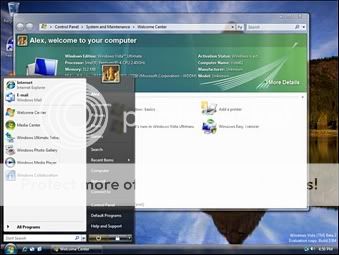
3. Now to see the small thumbnails of open windows like in vista. This application is Visual Task Tips. It needs a very little disk space to run. to see the preview press the mouse arrow over the window in the taskbar
4. The good thing is that the above listed application's are totally free free.
To get a desktop almost similar to Xp there is a vista transformation pack that change the complete look of Windows XP to Windows Vista it is about 22.3 mb.But it contains the above mentioned programs and a vista theme and more.If you want an interface just like vista go for it.
Ask me if you guys have any queries.......
5. You can install Vista Transformation pack , you will get the whole new look from login screen to sidebar widget , clock and every other features that vista has. opt for full feature by selecting ALL when installing....
Many reasons to hate Google Chrome Beta
 Its fast but who needs a faster browser which crashes time to time, pages doesn't load properly
i have a mcafee antivirus and is set to maximum protection, and is always enabled, i cant connect to net through chrome .until i disable my mcafee antivirus.
Firefox on the other hand with especially tabs mix plus (tabs scrolling enabled ) and firefox buttons add ons gives the most preferred results. firefox is customizable and can be easily modified with add ons
we cant say its a total failure ,but it surely not comparable to firefox in its beta stage, chrome is fast but its equivalent to firefox
we can install FAST DIAL plugin in Firefox to get the snapshot of bookmarked sites, which gives the same look and feel that we get from Google chrome.
Google chrome has some features that no other browser ever had.
Google chrome has some features that no other browser ever had.
1. Incognito Window : You can open Incognito Window from the menu next to address
bar. Whatever you browse in this window will not be recorded in history.
2. Task Manager : It has its own task manager. you can open chrome" s="" task="" manager="">
by right clicking on title bar -> task manager. It shows how many memory and cpu is
utilized by each tab.
3. Each tab is treated as new process so if one of the tabs hangs then the whole
browser is not hanged you can close this tab using task manager and use other
tabs as it is.
 Google launched it's very own web browser (beta) on (2 September 2008).
Going by the trend so far Google applications are known to be a hit in their beta stage itself.
Google launched it's very own web browser (beta) on (2 September 2008).
Going by the trend so far Google applications are known to be a hit in their beta stage itself.

How to secure your wi-fi network
So all up to you can go for a RSN which may require for u to implement a RADIUS server + create some digital certificates using SSL ...
or u can implement 64 bit WEP keys the most simple and easy to crack encrytion ...available..
All up to you mate WiFi security has all the above options....
MAC filtering
In some of the wireless routers, u can filter MAC addresses, see if ur wireless router has this feature,
if u r the only person connecting to the wireless router then enter the MAC address of the wireless card of ur desktop/notebook in the router's MAC filter list, so the router will allow to/fro traffic only to this computer.
do this along with the regular WEP 128 bit encryption
SpyderSoft Wi-Fi Defense(TM) is the most easy yet powerful security software for any wi-fi network, it's having some advance features which protects you from unauthorized access * PC running Windows 2000 or XP
* 400 MHz processor
* 128 MB RAM
* 10 MB free disk space on your hard drive
* Network card
* LAN or WLAN (Wi-Fi) network
Code:
 To secure ur Wi Fi Network the best possible solution til date is RSN and stands for Robust Secure Network then comes TSN or Tertiary Secure Network..and then WPA stands for WiFi Protected Access and then come our pretty old WEP encrytion which comes in mormally 128 and 64 bit encryption options.....
How to make the best use of your Webcam with oovoo
 You can make the best use of your webcam with video chat softwares ,
There are many website providing free video chat and conferencing feature. Yahoo, msn, skype and many more. but none of them allows you to send video messege.
Now with oovoo you can send video messege of 5 minutes, it also allows you to save 1000 minutes of video storage and give you 6 way live video chat plus it has some more features like pc to phone calling (free for 2 hours), sidebar view, add video effects.
I personaly used it and liked the interface very much, it has pretty high resolution video clarity, You can even chat with friends that dont have oovoo yet with web browser
On the other hand softwares like skype need third party programs to record chat video.
Now you can zoom your Notepad Content - Notepad v 2
 Notepad v 2 is a replacement for your current Notepad, it's a utility that let you zoom, do rectangular selection, do regular expressions and some other unusual features. it supports all windows version
Download Accelerator Plus (DAP), Fastest download manager
Requirements : Win (All)
License : Adware
File size : 6.9MB
 Download Accelerator Plus (DAP) is the fastest download manager, resume broken downloads ,it claims to increase the download speed to 500% and has around 170 million users worldwide, It has two version free and premium version, premium version would cost you $39.95, while premium version with speed optimizer cost you $49.90, It integrates with Internet Explorer, Firefox, Netscape and others.
